Trips · Itineraries · Journals

Every tripplanned.Every memorykept.

One calm place for the whole adventure. Day-by-day plans, flights handled from a flight number, a budget that keeps up, idea boards you plan together, and a journal that quietly turns the trip into a keepsake.

Free on the App Store · iPhone, Lock Screen and Apple Watch

every day, a photo card
with its own weather
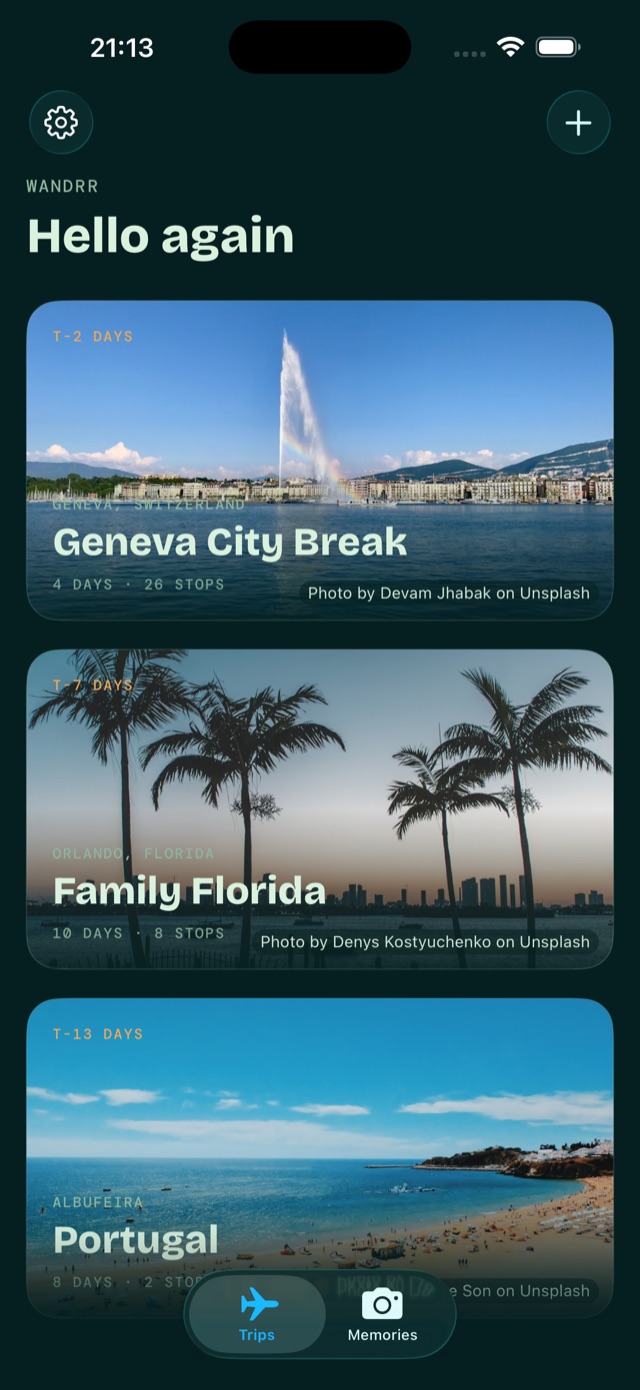
Wandrr home screen: photo cards for Tokyo Adventure (live, day 3 of 6), Amalfi Coast Honeymoon (21 days to go) and Family Florida (45 days to go)
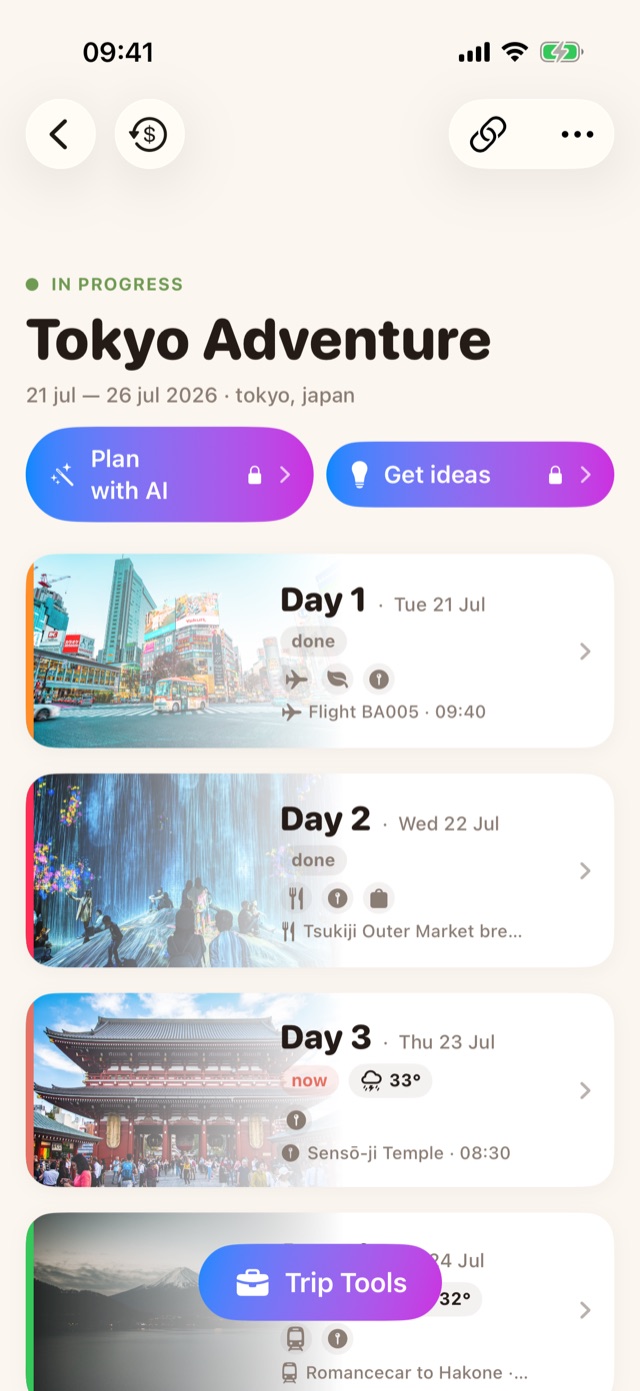
Tokyo Adventure itinerary in Wandrr: Plan with AI and Get ideas buttons above photo day cards with weather and status chips
Next trip
Cherry Blossom Tour
15 Sep – 23 Sep · Kyoto, Japan
00:00:00
23days to go
your next trip on the Home Screen,
counting down in real time
No more app-juggling

Everything you scatter across six apps, in one.

ItinerariesPlan with AIFlight autofillLive budgetMulti-currencyLock Screen travel dayIdea boardsScratch-off world mapCountdown widgetPacking listsAI phrasebookDocument walletJournalTrip recapSix trip templatesWeatherNear MeReceipt scanningApple WatchWorks offlineShare with a travel buddyPDF trip pack ItinerariesPlan with AIFlight autofillLive budgetMulti-currencyLock Screen travel dayIdea boardsScratch-off world mapCountdown widgetPacking listsAI phrasebookDocument walletJournalTrip recapSix trip templatesWeatherNear MeReceipt scanningApple WatchWorks offlineShare with a travel buddyPDF trip pack
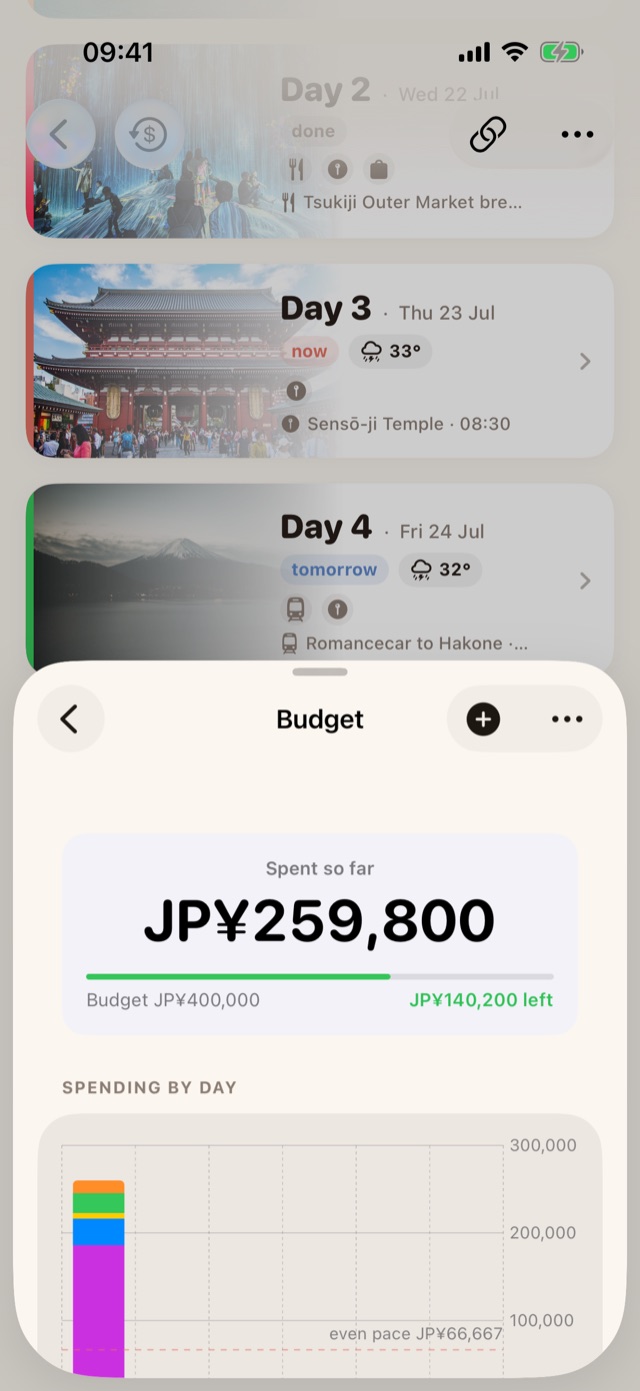
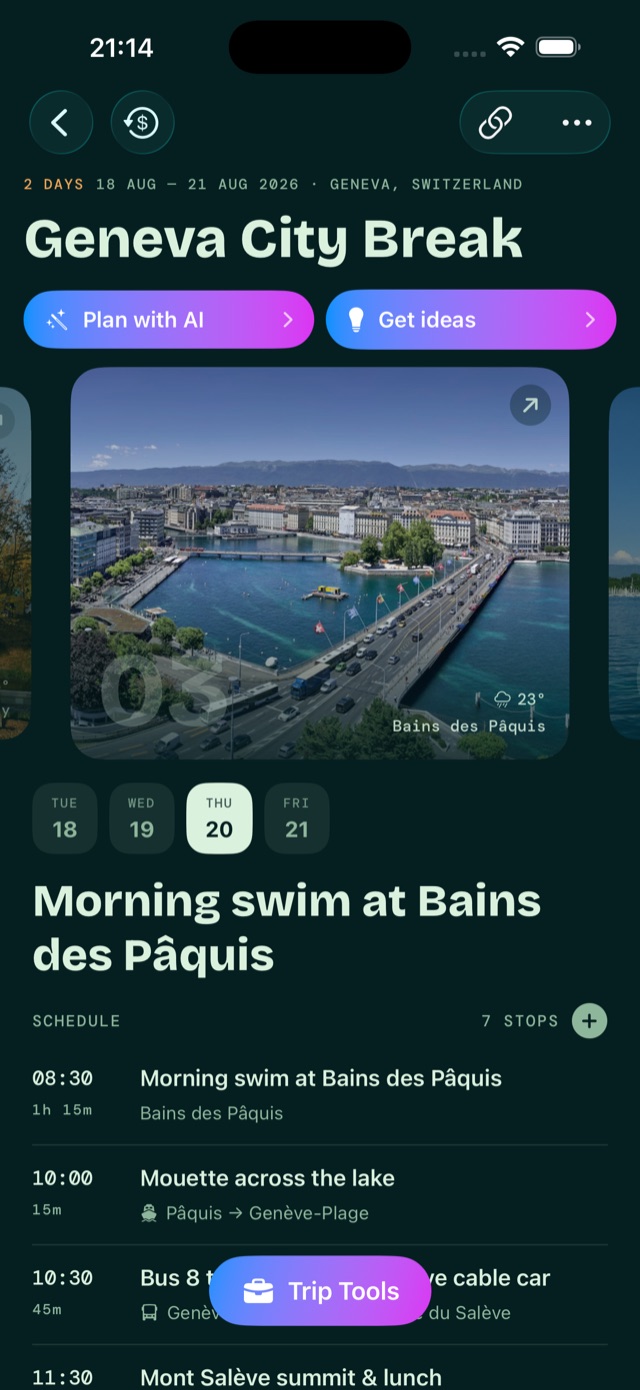
Tokyo Adventure itinerary with Plan with AI and Get ideas buttons and photo day cards Day 3 in Tokyo: Next up card for Izakaya night, Directions and Get a ride buttons, then a timed schedule Budget sheet: JP¥259,800 spent of JP¥400,000 with a spending-by-day chart Trip Tools sheet with Budget, Near Me, Trip Ideas, Packing, Photos, Wallet and Phrasebook Reykjavík trip recap: 6 sunsets, 11 stops, 19 photos, 145 km explored, £2,260 spent The same itinerary in the Evergreen theme: mint headings on deep green with a glowing photo day card A day schedule in the Evergreen theme with the Next up card, Directions and Get a ride, and getting-there times between stops The budget sheet in the Evergreen theme Trip Tools in the Evergreen theme A trip recap in the Evergreen theme
Same trip, two looks
01 · Before you go
Plan

Plan it day by day, or let AI draft the first pass.

Every day is a photo card carrying its own weather, status chip and highlights, yours to build and rearrange by hand. On Pro, Plan with AI drafts a whole day around your pace and interests, and Get ideas fills the gaps with real places, each one pinned to the map.

  • Six ready-made city templates to start from, free
  • Booking emails and PDFs read for you with Apple Intelligence
  • Multi-city trips and AI planning Pro
02 · On the day
Travel

Wake up knowing exactly where the day begins.

A gentle timeline walks you from temple to snack street to skyline, with your own notes riding along. The Next up card keeps one eye on what's coming. Directions, a ride, or a table are one tap away.

  • Apple Maps, Google Maps or Waze, your choice
  • Uber, Bolt and Lyft with the pickup already filled
  • Works offline. Your plans live on your phone
03 · The money bit
Budget

Spend on gelato, not on guesswork.

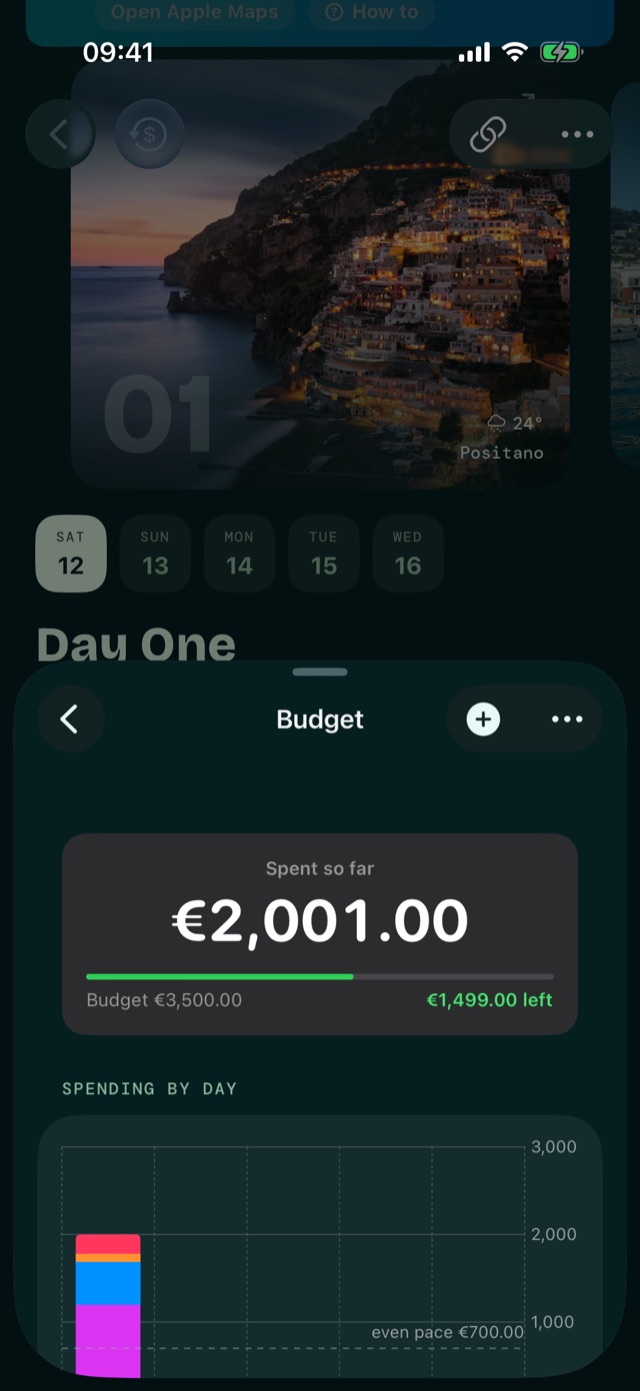
Set a budget and watch it breathe. Every espresso, boat day and hotel deposit sorted by category and by day, with what's left always in view. Yen stays yen and pounds stay pounds. Nothing is silently converted.

  • Spending by day, with an "even pace" line to beat
  • Live converter with your own bank rate if you prefer
  • Point the camera at a receipt and it's logged Pro
04 · The kit
Tools

A little toolkit for every "oh wait, where's my…"

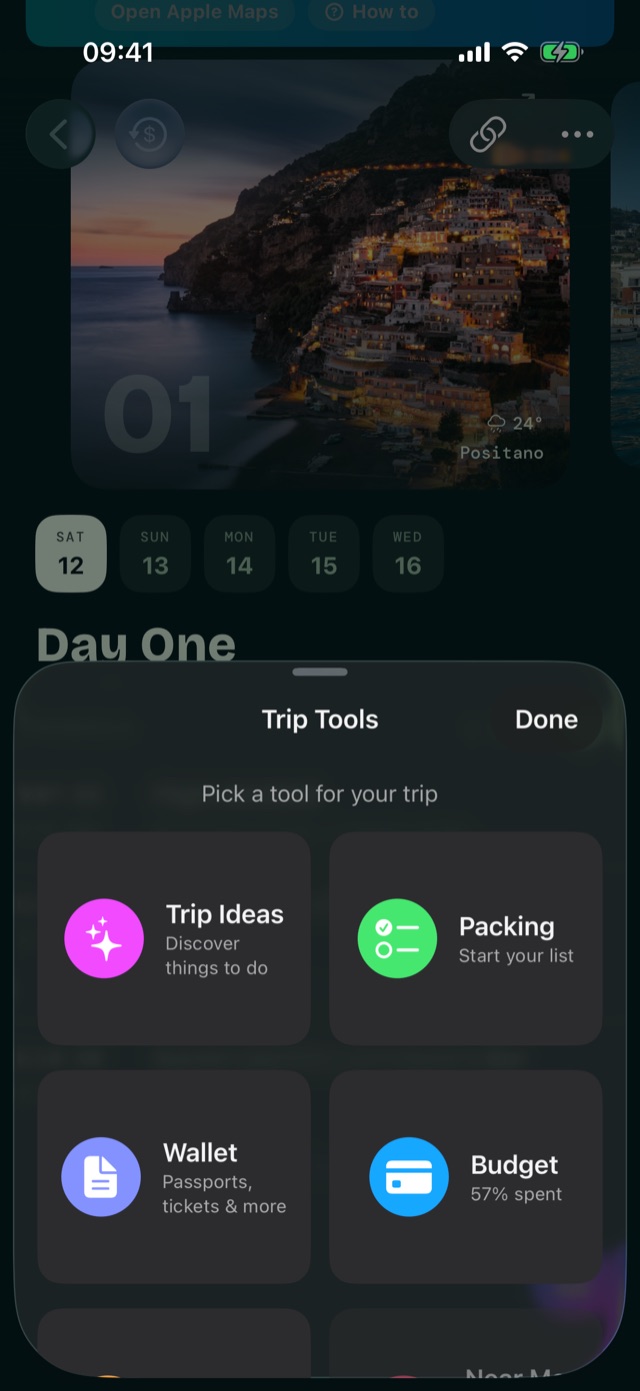
Slide up Trip Tools and it's all there: the budget, places near you, trip ideas, a packing list with quantities, your photos, a wallet for passports and tickets, and a phrasebook that spells out the pronunciation.

  • Starred packing favourites follow you to every trip
  • Every tool is free to fill in yourself
  • AI writes the packing list and phrasebook Pro
05 · After you're home
Remember

Come home with more than photos.

Wandrr quietly turns the trip into a keepsake as you go: the plans you actually followed, the notes you scribbled at midnight, the photos in their places. Every finished trip gets a recap of sunsets, stops, kilometres walked and what it all cost.

  • A journal built from your days, not a blank page
  • Steps and distance from Apple Health, read only
  • Every past trip on one shelf in Memories
NOW21:00
Now · until 21:00
teamLab Planets
Toyosu, Tokyo
Now
4 of 6
Wednesday 15 April20:35
Next up · 21:3045 min
Izakaya night in Asakusa
Hoppy Street · 12 min by metro
Travel day

The day lives on your Lock Screen.

On trip days Wandrr steps out of the app. What's happening now, what's next and how long you've got sit in the Dynamic Island and on the Lock Screen, and on your wrist in the Apple Watch Smart Stack. No unlocking, no hunting.

Now and next

A countdown to the next stop, and a progress bar for the leg you're on.

Journey mode

On a flight or train, the leg underway with its arrival time, in the arrival city's clock.

Evening nudge

When the day wraps, a quiet prompt to add a line to your journal while it's fresh.

Free · Countdown widget included

Flights, handled

Type the flight number. Wandrr does the rest.

One field instead of eight. Both airports with map pins, departure and arrival on each airport's own clock, the airline, the aircraft, the terminal. Then Wandrr keeps watching: if the airline quietly moves the flight, your itinerary moves with it and you hear about it before the airport does.

  • Autofill and schedule watch for the next 72 hours Pro
  • Gate, terminal, delays and baggage belt on the Live Activity Pro
  • "Clocks go back 1 hour" and "arrives the next day", in plain words
BA432 schedule changeNow departs 11:50 (was 11:35). Your itinerary has been updated.
Add transport · FlightPro
Find
Checking the airline's schedule
RouteLondon Heathrow LHR → Amsterdam Schiphol AMS
Departs · Arrives (local)Sun 14 Sep · 11:35 → 14:00
Airline · AircraftBritish Airways · Airbus A320neo
NotesDeparts Terminal 5
Agreed

Sunset dinner in Oia

Caldera-edge table down by Ammoudi Bay. Book for an hour before sunset.

CISBMT Added by you · Oia
Added to Greek Islands 2027

Catamaran day, swim stops included

Kleftiko caves, lunch on board, back for golden hour.

SBMT Added by Sophie · Milos
Idea boards

Dream it together before anyone books anything.

A board is where the "we should go here one day" links go. Everyone drops in places, notes and links. Heart the ones you love, and when two of you heart the same idea it quietly becomes Agreed. One tap moves the agreed pile into a real trip.

  • Save from Safari or any app with the share sheet
  • Friends join and collaborate for free
  • Create and share boards, share whole trips Pro
Where you've been

A map that fills in as you do.

Every trip colours in its country. Switch to flag view and each one flies its flag instead, clipped to the coastline. New countries arrive under foil you scratch away with a finger, which is exactly as satisfying as it sounds. Try both below.

At a glance · tap Show flags to switch viewsWhere You've Been
visitedcoming upscratch to reveal
rub to reveal
Australia · just back
0sunsets
0stops
0photos
0km explored
£0spent
Three moods, one app

Dress your trips the way you travel.

Three hand-crafted looks, all free, switchable mid-trip. Your plans stay exactly where you left them. The same Kyoto trip, three ways.

Souvenir · Scrapbook warmth. Polaroids, tape and handwritten margins.
Bento · Clean photo-led tiles in the sunset palette. Calm and modern.
Evergreen · Deep forest dark. Mint type, monospaced times, photographs left to glow.
Trips · 1 of 3
23 days to go
Kyoto, Japan
Cherry Blossom Tour
15 – 23 Sep · 9 days · 18 stops
01
The quiet superpower

Your travels are yours. Full stop.

Wandrr doesn't have a cloud full of your plans. It doesn't want one.

Stored on your device

Itineraries, budgets, documents and memories live on your iPhone and in your own private iCloud. Not on our servers.

AI that never comes to us

Planning, packing, phrasebooks and reading your booking emails all run through Apple Intelligence, on your iPhone or Apple's Private Cloud Compute. Your plans never reach Clora Tech and are never used to train a model.

No tracking

No analytics trawl, no ad profile, no selling where you sleep. It's a travel app, not a tracker. This website loads nothing from third parties either.

Wandrr Pro

Two trips free.
Pro does the work.

Plan two whole trips by hand, free, with every tool. Pro adds the AI that plans for you, flights handled from a flight number, idea boards you can share, receipt scanning, multi-city routes, sharing and export, and no limits.

  • Free — two trips, the whole planner by hand, all three themes
  • Pro — AI, flights, boards, multi-city, sharing and no limits
  • £3.99 / month · £29.99 / year · £89.99 lifetime
Now boarding

Get out the door.

Wandrr is on the App Store. Download it free and plan your first two trips on us.

FlightWD 2026
GateApp Store
SeatYour iPhone
ClassTwo trips free